






Messenger review
 Analysis by GetAllApps
I find Messenger most useful when a conversation needs to move between quick messages and richer ways of keeping in touch. It is a communication app from Meta Platforms, Inc., and its familiar chat-focused design makes it easy to pick up for everyday exchanges. The catch is that much of its convenience depends on a working connection: messages, calls, and shared media are only as dependable as the network available at the moment.
When the network is part of the conversation
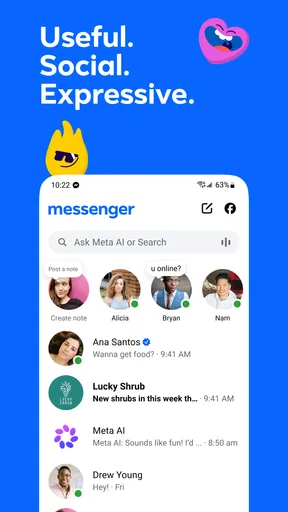
Messenger works well for staying in touch with friends and family who already use it. I can keep a casual chat going, send a quick update, or switch to a call when typing feels too slow. That flexibility is the app’s clearest strength: a conversation does not have to stay in one format.
Connectivity matters most when the exchange becomes time-sensitive. A short text may be enough to coordinate a pickup, but a call is more useful when plans are changing quickly. If the signal is weak, the richer option can become frustrating precisely when it would help most. I treat calls as convenient rather than guaranteed and keep an ordinary text message in mind as a fallback.
A realistic example is arranging dinner while commuting. I might message a friend with a change of time, then use a call if the details are unclear. If the train enters a poor-coverage stretch, the message may be the less demanding way to communicate, while a call can wait until the connection improves. This is not a flaw unique to Messenger; it is a practical limit of trying to have a live conversation over mobile networks.
With a 4.7 average from around 115 million ratings, it is clearly a widely used choice, but popularity does not make it the best fit for every conversation. Its strongest case is convenience when the people I want to reach are already there. If a group is scattered across different messaging services, the app cannot by itself solve that coordination problem.
Choosing the right moment for calls and media
I find it helpful to match the format to the connection and the task. Text is usually the sensible choice for a brief detail or a message that does not need an immediate answer. A call makes more sense when tone, urgency, or back-and-forth matters. Sharing media can add context, but it is less essential than a clear sentence when the network is unreliable.
That distinction is useful for more than conserving patience. If I am trying to communicate an address, time, or other important detail, I put the key information in the message rather than relying on a call that could break up. For complicated plans, I send a concise written recap after discussing them. It gives the other person something easy to refer back to, without turning the conversation into a long thread of corrections.
Moving between home, work, and travel
Messenger’s everyday appeal is that it can fit into short gaps: replying between errands, checking a family chat at home, or contacting someone while away. The app is free to install and is rated for Everyone, which makes it accessible to a broad audience. Its scale is substantial too, with over 5 billion installs, so many users will already have friends or relatives they can reach there.
That reach can make it a practical alternative to SMS when a group already coordinates in Messenger, and a more conversational option than email for informal plans. Compared with services built around a smaller, more private circle, its main advantage is often the chance of finding existing contacts there; the trade-off is that a large, familiar platform may not suit someone trying to keep social communication in a tightly limited set of apps.
For mobile use, I would avoid assuming that every setting is ideal for every situation. Before a trip or a busy day, it is worth checking that the app is ready to use and that important conversations are easy to find. When time is short, opening a familiar thread is more practical than composing a message from scratch in a rush. I also try to keep the message itself clear enough that the recipient can respond when they have a moment, rather than expecting an immediate call.
Messenger is less compelling if the people I need to reach prefer another service, or if my priority is a deliberately quiet phone. A broad social app can invite more conversation than I actually want during work or rest. In that case, using a simpler channel for essential contacts—or limiting when I check Messenger—may be a better choice than expecting one app to suit every social boundary.
What to do when a conversation stalls
When a message or call does not seem to go through, I first consider the connection before assuming the other person is ignoring me or that the conversation has disappeared. A momentary network issue can make a live exchange feel uncertain. I avoid sending the same message repeatedly; that can create duplicate replies once service returns. Instead, I wait briefly, check whether the connection has improved, and then send one clear follow-up if it is still needed.
For an urgent plan, I use the channel that is most dependable in that moment. If a call is breaking up, a short text may communicate the essential detail more effectively. If a message is not getting a response and the matter cannot wait, another way to contact the person may be sensible. Messenger is convenient, but it should not be treated as the only route for time-critical coordination.
Recovery is easier when the conversation has been written with context. “I’m at the east entrance; meet me there” is more useful than “I’m here” if a message arrives late. I also find that stating the action needed—such as confirming a time—reduces the chance of a long, confusing exchange when either person is dealing with a poor signal or limited attention.
Being thoughtful about mobile data
Because the app can carry more than text, the amount of network activity will depend on how I use it. A quick message is a different habit from frequent calls and media sharing. If I am on a limited mobile plan, I pay attention to whether a conversation really needs a call or whether a short written exchange will do. I also reserve larger or less urgent exchanges for a time when I am comfortable using my connection.
This is a practical habit rather than a claim about a particular data-saving setting. I do not assume Messenger will manage every network constraint in the way I want. For someone with a tight allowance, it is sensible to review the app’s current settings and the phone’s data controls, then choose a pattern of use that fits their plan. The app’s in-app purchases range from five cents to $7,999.99 per item, so I would also pay attention to any purchase prompts and make sure spending controls suit the person using the device.
Version changes are another reason to check the app occasionally rather than rely on an old impression of how it behaves. The current version is 584.1.0.61.98, and Messenger has been available since January 30, 2014. I do not judge its day-to-day usefulness by version numbers; what matters more to me is whether it remains reliable on my device and works for the people I contact.
A familiar tool, with a clear trade-off
My recommendation is for people who want one familiar place for informal messages and calls, especially when their friends or family already use it. Meta Platforms, Inc. has built an app that can handle more than one style of conversation, and the free price makes it easy to try. The large community is a genuine practical advantage: a messaging app is only helpful if the people you care about can be reached there.
I would skip it as a primary choice if I need communication to remain dependable through weak coverage, if the people around me use another service, or if I want fewer social interruptions. In those situations, a simpler messaging tool, a different network-based service already used by the group, or a non-app method for urgent contact may suit me better. No single service removes the limits of connectivity.
For ordinary social use, Messenger earns its place through flexibility and familiarity, not because every interaction is effortless. I get the best results when I keep urgent details in clear text, save calls for moments when a live exchange helps, and avoid treating an uncertain connection as a dependable lifeline. If that balance matches how you communicate, it is a practical app to have; if constant availability or strict control over digital distractions matters more, I would choose carefully.
Pros and cons
Pros
- Works across Android and iOS devices.
- Lets you send photos and videos in chats.
- Supports voice and video calls.
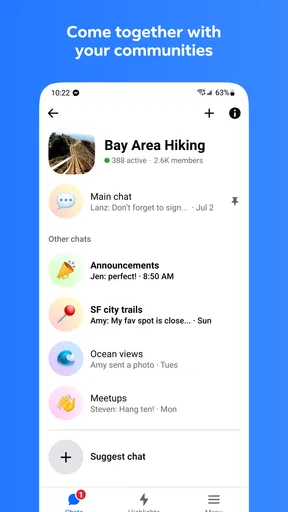
- Offers group chats for conversations with multiple people.
- Can connect with Facebook friends and contacts.
Cons
- Requires an internet connection for messaging and calls.
- Some features require a Facebook account.
- Notifications can become distracting in busy chats.
- Large media files may use significant mobile data.
- Privacy settings may take time to review and adjust.


